

TLDR
Check your dental website’s speed, mobile layout, crawlability and structure before deciding what to fix yourself or assign to a specialist. Technical SEO helps search engines find and understand your pages. Use the audit to identify barriers to finding services and contacting the practice, and review results after making changes.
Table of contents
Why Technical SEO Matters for Dental Practices
A dental and orthodontic SEO strategy combines technical access, useful service pages, accurate local profiles, and inquiry measurement. For a broader overview, visit Dental and Orthodontic SEO Strategy.
Search engines like Google crawl dental websites to understand what you offer and whether your site meets technical quality standards. A fast, mobile-friendly website with properly structured data signals to Google that your practice is trustworthy and relevant for patients searching nearby.
When your site meets these technical standards, it ranks higher in local search results—the moment patients use their phones to find ‘dentist in Peekskill’ or search for specific treatments while sitting in the waiting room or driving to an appointment. Poor technical health does the opposite: slow load times, broken mobile experience, and hidden information push your practice down in search results or out of them altogether, sending those patient inquiries to competitors instead.
This matters because patient behavior has changed. Most dental searches happen on mobile devices, often in high-intent moments when patients are ready to book. If your website takes five seconds to load or doesn’t display properly on a phone, patients leave before seeing your hours, location, or contact information. Google knows this and penalizes slow, unresponsive sites in rankings.
Technical SEO is not about rankings for their own sake—it’s about staying visible and accessible at the moment patients need you. That visibility translates directly to more calls, appointment requests, and new patients for your practice.
Your practice’s entire marketing effort—paid ads, local listings, reviews, content—funnels to your website. If the technical foundation is weak, that traffic doesn’t convert into appointments. Understanding and fixing technical issues is often the fastest, highest-ROI investment a practice can make before spending more on ads or content.
Core Technical SEO Areas for Dental Websites
Five main technical areas affect search rankings and patient experience on dental websites. Understanding each one helps you prioritize fixes and know what to evaluate on your own site.
Site Speed and Page Performance
Slow websites lose patients and hurt rankings. When a patient searches for an emergency dentist or tries to schedule an appointment on your website, every second of delay increases the likelihood they’ll abandon the page and contact a competitor instead. Google factors page speed into ranking algorithms because users prefer fast sites. More importantly, your practice should too: a good starting target is a page load time under three seconds on mobile, as faster pages typically see higher patient conversion rates than slower ones.
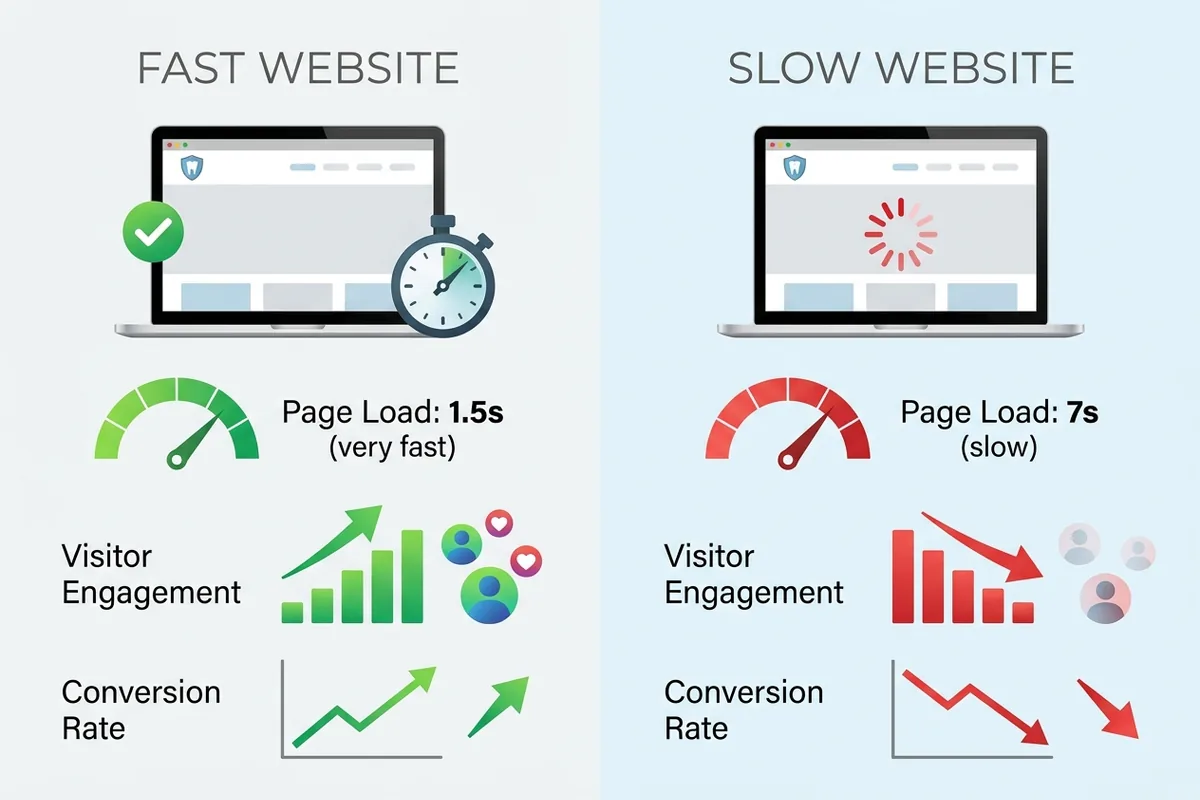
You can measure your site speed for free using Google PageSpeed Insights or GTmetrix. Enter your website URL, and these tools show you how fast your pages load on mobile and desktop, flag bottlenecks like large unoptimized images or slow hosting, and suggest fixes. Most practices discover that outdated hosting, uncompressed images, or bloated website platforms are culprits.
Mobile Responsiveness and User Experience
More than half of all dental searches happen on mobile devices. A responsive website automatically adjusts its layout, text, and navigation to fit phone screens without requiring horizontal scrolling or tiny, hard-to-read text. When a patient lands on your website from a mobile search, they should instantly see your phone number, hours, address, and a clear path to booking an appointment—without zooming or struggling.
Test your mobile experience yourself: visit your website on your smartphone. Is the navigation menu easy to tap? Can you read the text? Is the appointment booking button visible above the fold? Can you tap your phone number to call directly? If the answer to any of these is ‘no’, patients are bouncing away. Google rewards mobile-friendly sites with higher rankings in mobile search results, and mobile is where your patients are looking.
Structured Data and Schema Markup
Schema markup is hidden code added to your website that tells Google what your content means. For a dental practice, schema includes your business name, address, phone number, hours of operation, services offered, reviews, and appointment availability. Google uses this structured data to display your information accurately in local search results and on Google Business Profile.
Without schema, Google has to guess what information on your website is important. With schema, you’re telling Google exactly where to find your practice information and how to display it. This is especially critical for local search, where patients see your phone number, address, hours, and patient reviews directly in search results. Proper schema markup increases the chances that when patients search, they see your practice’s complete and correct information—and can call or book directly from the search result.
Site Crawlability and Indexing
Search engines use automated bots to crawl your website, following links from page to page to understand your content. Crawlability problems occur when bots can’t access pages, broken internal links block navigation, or pages are accidentally blocked from indexing. If your ‘Services’ page or ‘New Patient’ page is blocked or broken, Google can’t index it, and patients searching for those services won’t find your practice.
You can check crawlability using Google Search Console (free from Google). It shows you which pages Google has indexed, reports crawl errors, and highlights broken links. Common issues include accidentally blocking pages with robots.txt settings, outdated website redirects, or broken navigation menus. Most of these are fixable without coding—usually by updating website settings or fixing broken links in your site editor.
Site Architecture and Information Organization
How you organize your website affects both search engines and patient experience. A clear hierarchy—where your homepage links to main service pages, those pages link to specific treatments, and everything connects logically—makes it easy for Google to understand your site structure and for patients to find information. Confusing navigation, orphaned pages with no internal links, or a flat structure where everything links randomly creates friction for both bots and visitors.
For a dental practice, this means organizing your services logically: general dentistry at the top level, with specific treatments (cleanings, fillings, root canals) nested beneath. Your new patient pages should link to insurance information and booking. Your blog should link back to relevant service pages. Internal links create pathways for Google to discover and rank your content while guiding patients toward appointment booking.
How to Audit Your Dental Website’s Technical SEO
You don’t need coding skills to conduct a basic technical SEO audit. Follow these steps to identify issues on your own site:
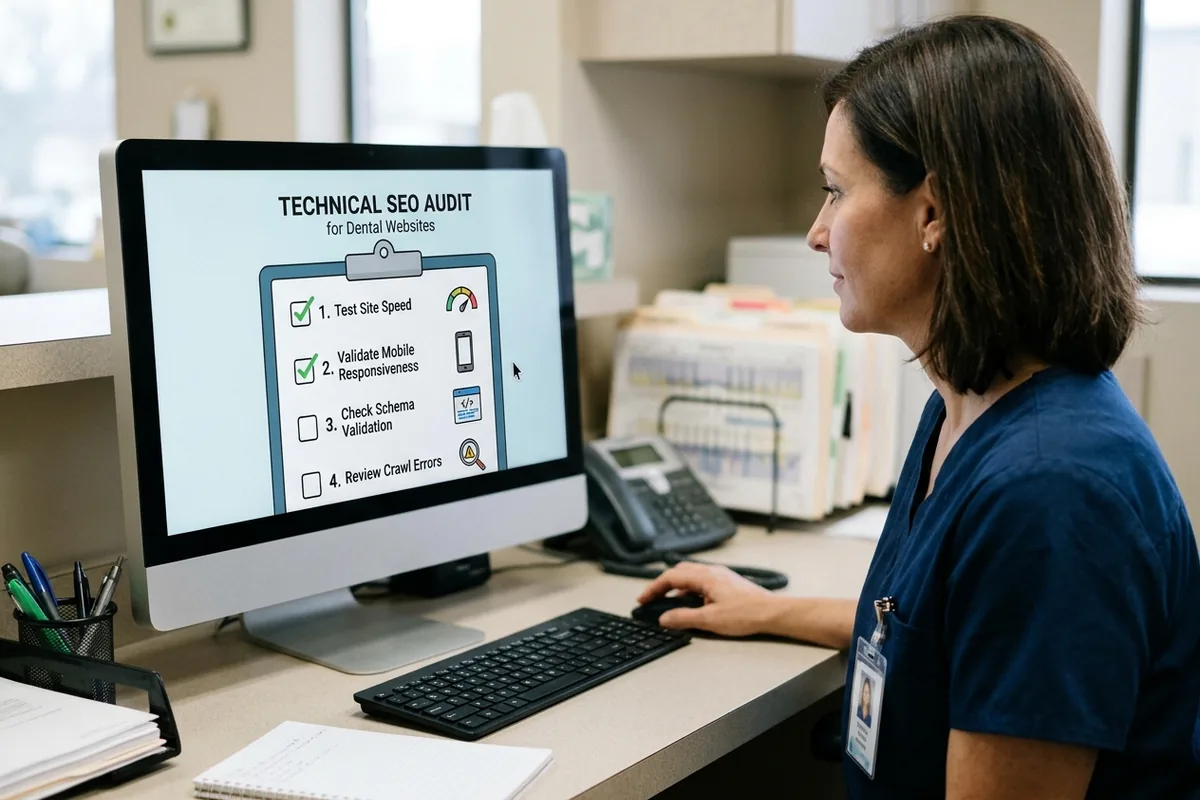
- Test Site Speed. Visit Google PageSpeed Insights (pagespeed.web.dev), enter your website URL, and run the test for mobile. Note the score and any red-flag issues listed. A score above 90 is strong; below 50 suggests significant problems. The report will list specific bottlenecks like ‘render-blocking resources’ or ‘unoptimized images’—you don’t need to understand the technical details, just flag them for your web developer or hosting provider.
- Check Mobile Responsiveness. Open your website on a smartphone (or use Chrome’s mobile device emulator by pressing F12 and clicking the phone icon). Navigate through your pages. Is everything readable? Can you tap buttons easily? Are phone numbers and the appointment booking button prominently visible? If the experience is clunky, mobile responsiveness is an issue.
- Verify Your Local Business Schema. Right-click anywhere on your website homepage, select ‘View page source’, and search (Ctrl+F) for ‘schema’ or ‘organization’. If you see structured data markup mentioning your business name, address, and phone number, you have some schema in place. If not, it’s missing. You can also use Google’s Structured Data Testing Tool to check what schema your site currently has.
- Set Up Google Search Console. Go to search.google.com/search-console, add your website, and verify ownership. Once verified, the ‘Coverage’ report shows which pages Google has indexed and which have errors. The ‘Core Web Vitals’ report shows page performance issues. These free reports give you a clear picture of indexing and speed problems.
- Check for Broken Links. Use a free tool like Screaming Frog (screaming-frog.co.uk) or Broken Link Checker (brokenlinkcheck.com) to scan your entire website and flag broken internal and external links. This takes five minutes and immediately shows you which pages have links that lead nowhere.
After these five steps, you’ll have a clear picture of your site’s technical health and a list of issues to prioritize.
Common Technical SEO Mistakes Dental Practices Make
Practices of all sizes share recurring technical problems that hurt search rankings and patient experience. Knowing these mistakes helps you avoid them—or recognize them if they’re already on your site.
Outdated Website Platforms. Many dental practices use old website builders or outdated WordPress themes that lack modern performance optimization, mobile responsiveness, or built-in schema support. These platforms often bloat pages with unnecessary code, making sites slow and hard for Google to crawl. If your website is more than five years old and wasn’t built with mobile-first design in mind, it’s likely underperforming technically.
Missing or Incomplete Local Schema. Your practice information (name, address, phone, hours, services) must be marked up with schema so Google can confidently extract and display it in local search results. Many practices skip this step, forcing Google to guess—which often results in incorrect information appearing in search results or your practice being demoted in local rankings.
Poor Mobile Experience. Practices that built websites years ago for desktop visitors often find those sites don’t work well on phones. Tiny text, buttons that are hard to tap, slow mobile load times, and appointment booking flows that are confusing on a small screen all hurt conversion and rankings. Google’s ranking algorithm prioritizes mobile experience, so this is critical.
Slow Hosting and Unoptimized Images. Practices often inherit cheap, shared hosting that doesn’t prioritize speed, or they upload images directly from cameras without compression. Large image files and inadequate server infrastructure slow down pages significantly. A simple move to better hosting or image compression can cut load times in half.
Duplicate or Thin Content Across Multiple Pages. Some practices copy the same content to multiple pages (e.g., the same service description repeated on services, treatments, and blog posts) without differentiation. Google may penalize this or pick the wrong version for ranking. Similarly, pages with very little unique content dilute your site’s authority and confuse search engines about which pages matter most.
Broken Internal Links and Navigation. When practices update their website, old pages sometimes get deleted without redirects, or menu links point to pages that no longer exist. Every broken link is a dead end for Google’s crawlers and a frustration for patients trying to navigate.
These mistakes are common because practices focus on content and marketing without addressing the technical foundation. Fixing them creates immediate improvement in both rankings and patient experience.
When to Hire a Dental SEO Specialist
After auditing your site, you may discover technical issues that need attention. The question then becomes: should you fix these yourself or hire professional help?
Consider a self-service approach if you have an in-house web developer, your issues are limited (e.g., one or two specific problems like image compression or a broken link), and you have time to research and implement fixes carefully. Many technical tasks—like optimizing images, fixing broken links, or updating schema in a website builder—can be handled by someone without deep coding expertise. Free resources and guides abound.
Hire a specialist if your practice lacks internal technical expertise, you’re uncertain about the scope or severity of issues, implementation involves coding or server configuration, or you can’t risk mistakes that might knock your site offline or worsen rankings. Practices with limited technical expertise or tight timelines often benefit from hiring a specialized dental SEO agency to audit, prioritize, and implement technical improvements rather than attempting fixes internally. A specialist brings experience diagnosing what matters most, can implement fixes safely, and ensures nothing breaks in the process.
The decision often comes down to ROI and risk. If you’re unsure whether a fix is safe or necessary, a consultation with an SEO specialist costs far less than recovering from a broken website.
Practices with limited technical expertise or tight timelines often benefit from hiring a specialized dental SEO agency to audit, prioritize, and implement technical improvements rather than attempting fixes internally. A specialist brings experience diagnosing what matters most, can implement fixes safely, and ensures nothing breaks in the process.
Understanding your options around Dental Seo Keyword, Dental Website Development, and Dental Practice Brand helps you contextualize whether technical SEO alone will meet your goals or whether you need broader support. For practices seeking integrated guidance on how technical foundations support your overall marketing strategy, understanding the full picture helps you prioritize your next steps. Learn more about how technical SEO fits into your broader Dental Orthodontic Seo.
Your Next Steps for Technical SEO Success
Optimize your dental website with technical SEO best practices by starting with a free audit. Run your site through Google PageSpeed Insights, test mobile responsiveness, check Google Search Console for indexing issues, and scan for broken links. Most practices discover one or two quick wins—like image optimization or fixing broken links—that improve speed and rankings immediately.
After the audit, prioritize fixes by impact: address site speed first (it affects both rankings and patient experience), then mobile responsiveness, then local schema. Once your technical foundation is solid, your SEO strategy, content, and paid advertising efforts will work more effectively because traffic will convert better.
After the audit, prioritize fixes by impact: address site speed first, then mobile responsiveness, then local schema. Once your technical foundation is solid, contact Ortho Marketing to discuss how technical improvements position your practice for better search visibility and patient acquisition.
Summary
Technical SEO is the digital foundation of your dental website’s visibility in local search. Search engines reward fast, mobile-friendly websites with proper schema markup and clean architecture—and so do patients. By auditing your site using free tools, understanding the five core technical areas, and addressing common mistakes, you can improve both rankings and the patient experience without expensive overhauls.
Whether you handle fixes internally or partner with a specialist, the investment in technical health pays dividends in patient inquiries and appointment bookings. Start with your audit today, prioritize the highest-impact fixes, and watch your practice’s search visibility improve.
FAQ
What is technical SEO for dental websites?
Technical SEO refers to the backend performance and structure of your website—including speed, mobile responsiveness, site architecture, structured data markup, and crawlability. It ensures search engines can find, understand, and rank your site, and that patients have a fast, smooth experience on any device. For dental practices, strong technical SEO means patients can quickly find your hours, location, phone number, and book appointments.
Why does site speed matter for my dental practice’s search rankings?
Google factors page speed into ranking algorithms because users prefer fast websites. For your practice, slow pages mean patients bounce away before seeing your services or booking information, hurting both conversions and search rankings. Pages that load in under three seconds on mobile convert far better than slower sites, making speed a direct driver of new patient inquiries.
How do I know if my dental website is mobile-responsive?
Open your website on a smartphone and navigate through key pages: homepage, services, new patient info, and appointment booking. Text should be readable without zooming, buttons should be easy to tap, and your phone number and appointment button should be immediately visible. If you struggle to navigate or read content, your site has mobile responsiveness issues. You can also use Google’s mobile-friendly test tool.
What is schema markup and do I need it on my dental website?
Schema markup is hidden code that tells Google what your website content means—your business name, address, phone, hours, services, and reviews. Google uses this structured data to display your information correctly in local search results. Yes, you need it: without schema, Google may display incorrect information or rank your practice lower in local search results where patients actually search for dentists.
Can I fix technical SEO issues myself, or do I need to hire a specialist?
Simple fixes like optimizing images, updating website text, or fixing broken links can often be handled internally if you have a web developer on staff or are comfortable using your website builder. Complex issues like server configuration, advanced coding, or a complete website rebuild are better handled by a specialist to avoid mistakes that could hurt your site or rankings.
How long does it take to see ranking improvements from technical SEO fixes?
Simple fixes like mobile optimization or schema markup can show ranking improvements within two to four weeks as Google recrawls and re-indexes your site. Larger fixes like migrating to faster hosting may take longer. The most important factor is that fixes remove barriers to search visibility and patient experience—improvement typically follows within a month or two.


